RAG(Retrieval-Augmented Generation、検索拡張生成)は、LLMに質問する前に関係する資料を検索し、その資料をプロンプトに添えて回答させる手法です。LLMそのものには手を加えず、LLMに渡す入力を工夫する方法です。
名前は、2020年に発表された次の論文(Lewis ほか、NeurIPS 2020)に由来します。
Retrieval-Augmented Generation for Knowledge-Intensive NLP TasksLarge pre-trained language models have been shown to store factual knowledge in their parameters, and achieve state-of-the-art results when fine-tuned on downstream NLP tasks. However, their ability to access and precisely manipulate knowledge is still limited, and hence on knowledge-intensive tasks, their performance lags behind task-specific architectures. Additionally, providing provenance for their decisions and updating their world knowledge remain open research problems. Pre-trained models with a differentiable access mechanism to explicit non-parametric memory can overcome this issue, but have so far been only investigated for extractive downstream tasks. We explore a general-purpose fine-tuning recipe for retrieval-augmented generation (RAG) -- models which combine pre-trained parametric and non-parametric memory for language generation. We introduce RAG models where the parametric memory is a pre-trained seq2seq model and the non-parametric memory is a dense vector index of Wikipedia, accessed with a pre-trained neural retriever. We compare two RAG formulations, one which conditions on the same retrieved passages across the whole generated sequence, the other can use different passages per token. We fine-tune and evaluate our models on a wide range of knowledge-intensive NLP tasks and set the state-of-the-art on three open domain QA tasks, outperforming parametric seq2seq models and task-specific retrieve-and-extract architectures. For language generation tasks, we find that RAG models generate more specific, diverse and factual language than a state-of-the-art parametric-only seq2seq baseline.arXiv.org(arxiv.org)
この論文では、Wikipediaから関連する文章を検索して文章生成モデルに渡す構成を提案し、質問応答のベンチマークで当時の最高性能を出しました。
何のために使うのか
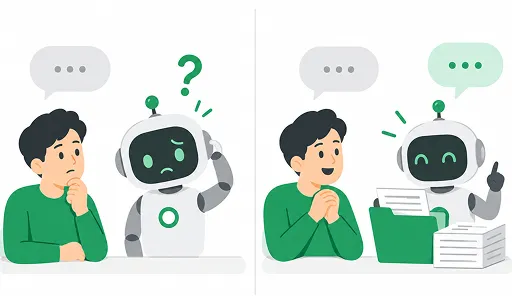
LLMは、学習したデータの範囲でしか答えられません。そのため、次のような問題があります。
- 社内文書のような公開されていない情報は知らない
- 学習データを集めた時点より後の出来事は知らない
- 知らないことでも、もっともらしい文章で答えてしまうことがある(ハルシネーション)
RAGを使うと、LLMを学習し直さずに、手元の資料をもとに答えさせることができます。回答の根拠になった資料を利用者に示せるので、内容が正しいかを確認しやすくなります。資料が更新されたときも、検索対象のデータを入れ替えるだけで済みます。
どう動くのか
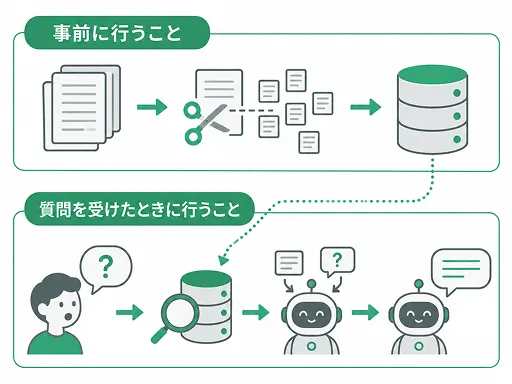
RAGの処理は、事前に行う準備と、質問を受けたときに行う処理の2つに分かれます。
事前に行うこと
- マニュアルやFAQなど、答えの元にしたい資料を集める
- 資料を数百文字程度の断片(チャンク)に分ける
- 各チャンクを埋め込みモデルでベクトル(意味を表す数値の配列)に変換し、元の文章と一緒に保存する
チャンクに分けるのは、資料をまるごとLLMに渡すと長すぎるためと、質問に関係する部分だけを取り出せるようにするためです。
質問を受けたときに行うこと
- 質問も同じ埋め込みモデルでベクトルに変換する
- 質問のベクトルと近いチャンクを検索する(ベクトル検索)
- 見つかったチャンクと質問をまとめてLLMに渡し、回答させる
LLMに渡すプロンプトは、たとえば次のような形です。
次の資料をもとに質問に答えてください。
資料に書かれていない場合は「分かりません」と答えてください。

# 資料
(検索で見つかったチャンク)

# 質問
有給休暇の申請は何日前までに出せばよいですか。
検索方法はベクトル検索だけでなく、キーワードの一致で探す全文検索や、その2つを組み合わせたハイブリッド検索が使われることもあります。
注意点
RAGを使っても、必ず正しく答えられるわけではありません。
- 検索で必要な資料が見つからなければ答えられない:回答の質は検索の精度に大きく左右されます。チャンクの分け方や検索方法で結果が変わります。
- 正しい資料を渡しても間違えることがある:ハルシネーションは減りますが、なくなるわけではありません。
- 渡せる資料の量に上限がある:LLMが一度に読める長さには限りがあるため、検索結果のうち何件を渡すかを決める必要があります。
うまく答えられないときは、まず検索で正しいチャンクが取れているかを確認するのが基本です。このブログでは、チャンクの分け方や検索方法などを今後一つずつ試していきます。
 しがないRAG屋さん